Kubernetes 图形化管理工具 Kuboard 的安装使用
Kuboard 简介
Kuboard,是一款免费的 Kubernetes 图形化管理工具,Kuboard 力图帮助用户快速在 Kubernetes 上落地微服务,Kubernetes 容器编排已越来越被大家关注,然而使用 Kubernetes 的门槛却依然很高,主要体现在这几个方面:
- 集群的安装复杂,出错概率大
- Kubernetes 相较于容器化,引入了许多新的概念,学习难度高
- 需要手工编写 YAML 文件,难以在多环境下管理
- 缺少好的实战案例可以参考
Kuboard 特点
- 无需编写 YAML
- 纯图形化环境
- 多环境管理
相关文档
- 官网:https://www.kuboard.cn/
- 安装文档:https://www.kuboard.cn/install/v3/install.html
安装工程
在线安装:
kubectl apply -f https://addons.kuboard.cn/kuboard/kuboard-v3.yaml访问 Kuboard
- 在浏览器中打开链接
http://your-node-ip-address:30080 - 输入初始用户名和密码,并登录
- 用户名:
admin - 密码:
Kuboard123
- 用户名:
离线搭建部署高可用 k3s 集群
k3s 是一个轻量级 Kubernetes,它易于安装,二进制文件包小于 40 mb,只需要 512MB RAM 即可运行。
Vue 中的 JSON 操作及展示
vue-json-viewer
vue-json-viewer 主要用于 JSON 展示。
官网
https://www.npmjs.com/package/vue-json-viewer
安装
npm install vue-json-viewer --save引用
全局引用:
import JsonViewer from 'vue-json-viewer'
Vue.use(JsonViewer)
页面引用:
import JsonViewer from 'vue-json-viewer'

export default {
  components: { JsonViewer },
  data() {}
}
使用
<json-viewer :value="showtext" :expand-depth=4 copyable sort></json-viewer>参数
| 参数 | 描述 | 默认 |
|---|---|---|
value |
JSON 数据(可与 一起使用v-model) |
必需的 |
expand-depth |
在此深度下折叠块 | 1 |
copyable |
显示复制按钮,您可以自定义刚刚设置的复制文本{copyText: 'copy', copiedText: 'copied', timeout: 2000}或设置true使用默认复制文本 |
false |
sort |
在显示之前对键进行排序 | false |
boxed |
为组件添加花哨的 “盒装” 样式 | false |
theme |
为主题添加自定义 CSS 类 | jv-light |
expanded |
默认展开视图 | false |
timeformat |
自定义时间格式功能 | 时间 => time.toLocaleString() |
preview-mode |
无扩展模式 | false |
Windows 根据端口查看并杀掉进程
查看进程号
用 netstat -ano | find 端口号 查出进程号:
netstat -ano | findstr 8181
  TCP    0.0.0.0:8181           0.0.0.0:0              LISTENING       18128
  TCP    [::]:8181              [::]:0                 LISTENING       18128
查看进程
takslist 查询当前的进程
tasklist | grep 18128
java.exe                     18128 Console                    1     63,036 K
杀死进程
通过 tasklist /pid 进程号 杀死进程。
taskkill /pid 18128
成功: 已终止 PID 为 18128 的进程。
也可以通过 taskkill /f /t /im 进程号 杀死进程。
taskkill /f /t /im 18128
成功: 已终止 PID 23064 (属于 PID 18128 子进程)的进程。
成功: 已终止 PID 18128 (属于 PID 19508 子进程)的进程。
taskkill
taskkill 是 Windows 命令行里终止指定程序 “进程” 的命令。
- /f 表示强制终止
/im 表示指定的进程名称,例如 “explor.exe" - /pid 表示指定的进程 ID 进程号
权限不足
如果权限不够,用管理员权限运行 cmd,发现又报错了,说要强制执行才可以,则需要加上 - F 参数。
taskkill /pid 5384
错误: 无法终止 PID 为 5384 的进程。
原因: 只能强行终止这个进程(带 /F 选项)。

taskkill -f /pid 5384
成功: 已终止 PID 为 5384 的进程。
使用 PowerShell(推荐)
Get-NetTCPConnection -LocalPort 8181 | Format-Table -Property LocalAddress,LocalPort,State,OwningProcess

taskkill /PID 19732 /F
根据进程名终止
# 如果是Java应用
taskkill /IM java.exe /F

# 如果是特定应用
taskkill /IM "应用名.exe" /F
强行重置
如果在 takslist 中查不到对应的进程。
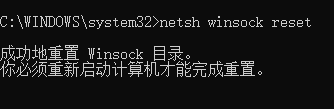
则需要用管理员身份打开 dos , 输入 netsh winsock reset ,再重启电脑。
netsh winsock reset